Current Students

  • Diverse students share a smile.

Registration Policies and FAQs

This page will help you solve registration problems independently or after hours. During business hours, feel free to contact Records & Registration, Office of the Registrar.

Enrollment Requirements & Policies

The topics and FAQ on this page are designed to help you navigate and interpret academic policies and procedures pertaining to enrollment, your class schedule, final exams and more. Visit University Catalog: Policies & Procedures for the authoritative A to Z list; focus and filter your search with the categories and keywords in the left column.

Registration FAQ

Select a topic from the list below for questions and answers.

Add, Drop or Swap Classes

How do I add or drop a class?

View the Add Classes Guide and Drop or Swap a Class Guide.

To add or drop after classes begin, see Late Schedule Changes.

For more tutorials, visit the How-To Guides.

What is "swap classes" and how does it work?

Swapping classes allows you to “trade” one class for another without giving up your seat in the original class until your enrollment in the new class is confirmed. In contrast, when you drop a class and then add another as two separate transactions, you risk not having a seat in either class.

You can generally swap any two classes (if you meet the prerequisites for the new class) online during the registration periods and dates published in the Registration Calendar. However, be careful with corequisite lecture and lab courses. You'll need to satisfy the paired enrollment requirement as follows:

  • If a lecture class permits any class section of a corequisite lab, you may swap either the lecture or the lab for another section of the same course (e.g., BIOL 100 or BIOL 100L). This will satisfy the enrollment requirement.
  • If you are taking a grouped CHEM 101 lecture and discussion, you cannot swap the lecture or discussion components. However, you can swap the CHEM 101L lab because any class section of the corequisite lab is permitted (the five-digit class section numbers do not matter).
  • You cannot swap corequisite courses if they are linked at the class section level. That is, the two corequisite courses have been paired using their specific five-digit class section numbers. You must enroll in the prescribed class sections.

Always look at the Class Notes section of Class Search to learn if specific sections have been paired. Refer to Course Requisites on this page.

Helpful: Drop or Swap a Class Guide

Class Schedule

I can’t find an open class that I really need. What should I do?

Sometimes you can’t get the classes you want, so here are some strategies:

  • Wait list for closed classes. If a seat opens up, you might be added.
    Helpful: Wait List for Closed Classes Guide
  • Attend a class for the first week or so and ask the professor to give you a permission number to add. Though there is no guarantee you’ll be added, participate as if you were enrolled. If you persist and other students drop, you might be added.
  • Consider taking a CSU Fully Online Course, a program that allows eligible CSU students to take one fully-online, asynchronous class per semester at any other CSU campus at no additional charge.
  • Ask your academic advisor to suggest additional ideas and to advocate on your behalf if necessary.
  • For the future, add your priority classes first as soon as your enrollment appointment arrives. Use the Registration Planner lock courses feature to plan the rest of your schedule around your priority classes.

A class I enrolled in has disappeared from my schedule. What happened?

A class missing from your schedule in the CSUN Portal may have been cancelled. Normally, the department will email you when a class is cancelled.

To confirm that the class has been cancelled, go to Class Search (no login required) and look up the missing course. On the Search Results page, click the Detail icon. The Class Status field should display "Cancelled.”

You can also contact the academic department to confirm the class was cancelled. Be sure to tell them the five-digit class section number.

Course Requisites

What are course requisites?

Course requisites are requirements or conditions that must be met before you can enroll in a class. If you haven’t met the requisites, you won’t be able to add the class. Take a moment to understand requisites.

Types of Requisites

  • Prerequisite: A course that is required before you can take another course. For example, you must first successfully complete French 101 (or its equivalent) before you can enroll in French 102. The SOLAR registration system checks student records to ensure prerequisites have been met.
  • Corequisite: Two or more classes must be taken concurrently. For example, the lecture BIOL 106 must be taken concurrently with the related lab BIOL 106L. To enroll successfully, place both corequisites, the lecture and the lab, into your cart before submitting your request.
  • Conditions can be pre- and corequisites. These may include class level (e.g., junior standing), a specific exam score, a specified passing grade, etc. For example, enrolling in CHEM 101/L (lecture and lab) requires a satisfactory score on the Chemistry Placement Test or a grade of C or higher in CHEM 100 taken at CSUN only.

For details about multiple component and preparatory courses, visit the University Catalog entry Course Requisites: Definition of Terms.

Where can I find the requisites for a course?

You'll find course requisites in several places:

  • In the University Catalog course descriptions.
  • In the registration tools Class Search, Registration Planner and the online self-service Add Classes module. Any requisites will display in the “Class Notes,” “Course Description” and “Enrollment Information” sections of these tools.

Keep reading to learn more.

How do I enroll in corequisite courses?

Notice How Corequisites are Linked

You must always take corequisite courses concurrently and place both classes into your enrollment shopping cart before submitting your request. Be sure to match the correct pair of corequisites to avoid the "Requisites Not Met" error!

Many corequisite courses allow you to enroll in any combination of lecture + lab class sections. The five-digit class section numbers do not matter.

  • Example: As long as you place any section of BIOL 101 lecture and BIOL 101L lab into your enrollment cart at the same time, your request to add will succeed.

When corequisites are linked section-to-section, you’ll need to pay attention to the five-digit class section numbers. You must pair specific lecture + lab class section numbers to enroll.

  • Example: Five sections of ME 186/L: Mechanical Design I and Lab are offered. As indicated in "Class Notes," if you choose the ME 186 lecture class section #15994, you must also enroll in the ME 186L lab section #15995. Place this pair of class sections into your cart before submitting your request.
Tips & Tools to Enroll in Corequisites

Use your registration tools to notice which corequisites to add.

  • Class Search: Look up a course and select the Detail icon link for one of the class sections. Read the “Class Notes” section to check whether to enroll in any corequisite section or a prescribed section. If a specific section number is provided, write down the five-digit class numbers of the two courses you need to take concurrently. Now you're set to add the correct pair to your cart.
  • Registration Planner (login required): Select both corequisite courses before exporting a favorite schedule to your enrollment cart. You can run the Registration Planner validate schedule feature to check for corequisites.
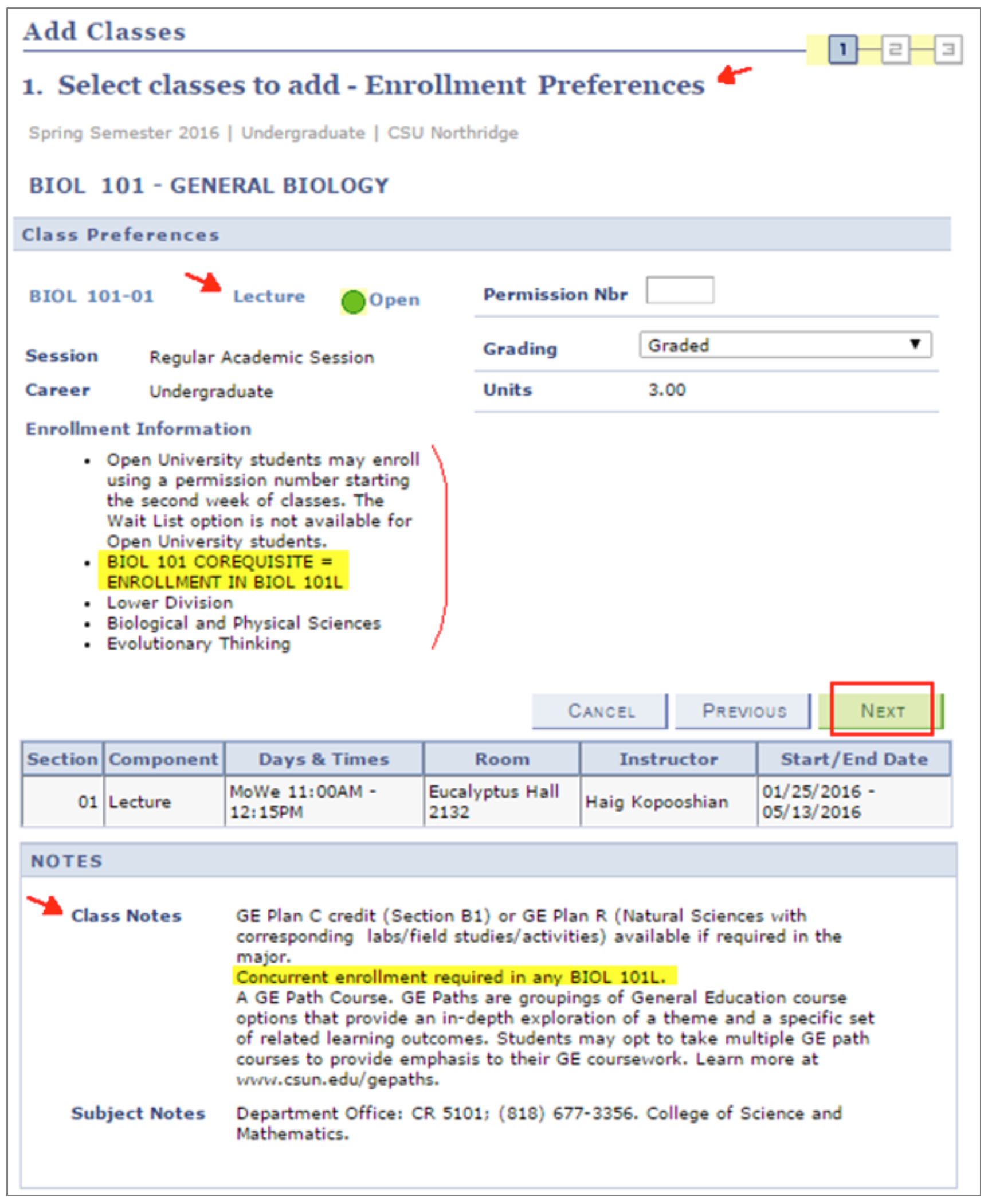
  • In self-service Add Classes, always review the "Enrollment Preferences" page shown in the image below. This example confirms that BIOL 101 requires concurrent enrollment in any section of the BIOL 101L. Place the corequisite lecture and lab sections into your cart before you finish enrolling.

To learn more about registration tools, visit the How-To Guides.

If you're still experiencing difficulty enrolling in a course with requisites, contact your academic advisor or the Office of the Registrar. Or, submit a Troubleshoot Enrollment Request Form.

Screenshot of How to Add Classes

Enrollment Appointments

What is an enrollment appointment?

All matriculated CSUN students (i.e., those enrolled in CSUN degree or certificate programs) receive an enrollment appointment each fall and spring semester. Your personal enrollment appointment is the earliest date and time that you can register for fall or spring classes. You may continue to add classes and adjust your schedule thereafter, until access to the online self-service registration system ends. Find exact dates at Registration Calendar.

Where can I find my enrollment appointment?

View your appointment in your CSUN Portal Checklist. Your enrollment appointment will display several weeks before it’s time to register. Helpful: My CSUN Portal Checklist Guide

When is my enrollment appointment?

For fall and spring enrollment, CSUN students receive a designated appointment. The Office of the Registrar will email you a "registration notice" several weeks before enrollment begins as a reminder to prepare.

For summer classes, CSUN students "self-appoint" a time to register on a first-come, first-served basis. Helpful: Enroll in Summer Classes Guide

How is my appointment determined?

CSUN students are assigned a fall and spring enrollment appointment based on their class level, the number of units completed at the time appointments are produced, and other factors. Seniors must apply to graduate to receive an earlier appointment. Did you know? Your completed number of units displays in your DPR audit.

Can I change my appointment?

Registration appointments are not negotiable. Plan ahead, enroll in priority classes first, use Registration Planner to fit classes into your schedule, and wait list for classes as needed. Helpful links:

Can I register before my enrollment appointment?

No. You must wait until your registration appointment day and time for access to the “Add Classes” pages through your CSUN Portal and the SOLAR Student Center.

My friend and I are both seniors, so why did he get a different registration date than I did?

Seniors who’ve applied for graduation have priority over those who have not. Registration appointments are prioritized; every student is assigned a time based on class level, number of completed units at the time appointments are produced, and other factors.

Enrollment Discrepancies

What if I find an error or other discrepancy in my CSUN record?

If you find a suspected error or discrepancy in your class schedule or other university record, be sure to report it to the Office of the Registrar for review and correction. As a student, you are responsible for ensuring the accuracy of your academic and student record.

Act immediately to correct an enrollment discrepancy before it becomes a bigger problem. Failure to correct an academic program discrepancy or to officially drop a class may result in a grade of “WU” (Withdrawal Unauthorized), which converts to an "F," in courses never attended.

This is important, so visit Report Enrollment Discrepancies to learn more.

Excessive Enrollment

Is there a limit to the number of times I can repeat a course?

The answer to this question covers two topics:

  • For-credit limitations on repeating a course, and
  • Repeating a course for grade “forgiveness” or averaging.
For-Credit Limitations on Repeating a Course

If an undergraduate student repeats enrollment in a course beyond its published maximum “for-credit” limitations (see University Catalog course descriptions), units earned will not be counted toward the bachelor’s degree. The units attempted and any grade points, however, will be averaged with the student’s other grades.
Examples include adapted exercise Kinesiology courses and performance-based Music courses. Check out these sample course descriptions that include for-credit limits:

Check with an academic advisor before re-enrolling in the course. If you want to exceed the number of times the course description allows you to take course, you must request permission from the associate dean of the college offering the course.

Repeating a Course for Grade Forgiveness or Averaging

Refer to the FAQ for "Repeating Courses" on this page.

Final Examinations

When are final exams?

Final exams are held during the week following the last day of formal instruction. Note that the last day of classes differs for weekday and weekend classes.

  • Fall and Spring Semesters: Find exact dates in the Registration Calendar.
  • Summer Term: Final exams are held on the last class meeting. Confirm date and time with your instructor.
  • Winter Term: Final exams are held on the last class meeting. Confirm date and time with your instructor.

You should refer to your personal final exam schedule in the CSUN Portal and verify it with your professors, but a general overview of the final exam schedule is published below in PDF:


Where can I find my final exam schedule?

Your current-semester final exam schedule displays in the CSUN Portal (login required). From the top navigation Academics menu, select My Classes and then Current Class/Exam Schedule. For a tutorial, visit View Final Exam Schedule.

  • After the fifth week of classes, revisit your final exam schedule in the portal to check for updates.
  • A few weeks before your last class meeting, ask your instructor or the academic department to confirm your final exam schedule.

If you see any time conflicts or other issues with your exam schedule, resolve them as soon as possible before final exam week begins.


What if I can't attend a final exam?

Bring any final exam time conflicts or other issues to the attention of your instructor as soon as you notice them and before final exams week begins.

  • If a time conflict occurs for the final exams between any two courses, contact both instructors immediately so they can help you resolve it.
  • If you cannot attend a scheduled final, contact your instructor to arrange to take the exam at another time, request a grade of Incomplete or find another solution.

Please review the Final Examination Policy.

Full- and Half-Time Enrollment

How many units do I need to enroll in to be considered a full- or half-time student?

The answer depends on your class level and your reason for meeting enrollment requirements.

Full-time enrollment is a minimum of:

  • 15 units for undergraduate students (12 units for financial aid* and certain external legal requirements).
  • 8 units for graduate students pursuing a master’s or doctorate.

Half-time enrollment is a minimum of:

  • 6 units for undergraduate students.*
  • 4 units for graduate students pursuing a master’s or doctorate.

Notes:

For additional enrollment status categories including credential and second bachelor's students, visit What Affects My Financial Aid: Enrollment Requirements and the University Catalog: Full-Time Enrollment Policy.

Maximum Unit Load

How many units can I enroll in each term?

Your maximum-allowed academic unit load depends on your class level, academic standing, the term in which you enroll, and, for undergraduates, whether or not you’ve applied to graduate. Please note:

  • The unit limits below go into effect as soon as registration begins.
  • Unit limits are subject to change without notice.

Undergraduate Students

The maximum academic load of enrolled units for undergraduate students in the fall or spring semesters is:

  • 18 units for students in good academic standing
  • 13 units for students on academic notice or readmitted under an Academic Performance Agreement 
  • 21 units for graduating seniors

You are a graduating senior if you have applied for a graduation date in the semester in which you are enrolling, and you will complete all remaining degree requirements by the end of the semester.

Graduate and Credential Students

The maximum academic load of enrolled units for graduate and credential students in the fall or spring semesters is:

  • 16 units for grad students in good academic standing
  • 13 units for grad students on academic notice

Summer & Winter Term Unit Limits

All students,* regardless of class level, can enroll in the following maximum unit loads during the accelerated summer and winter terms:

  • Summer term: 13 units for all three sessions combined
  • Winter session: 4 units maximum

* Note: Previously disqualified students may only enroll in CSUN courses through the Tseng College Open University or ASAP programs. These programs are not available to international students in disqualified status.


How many units can I wait list for?

You can wait list for 13 units maximum as soon as fall, spring or summer registration begins. Note: Waitlisted units are not enrolled units.


Are there any exceptions to the unit limits?

If you need to exceed the maximum enrolled-unit limit, choose units wisely by consulting with your academic advisor and using the degree planning tools. If you decide to proceed, complete the Extra Unit Authorization for your class level:

Extra Unit Authorization Timeline

  • Submit the Extra Unit Authorization request no later than the end of the Late Registration period for fall and spring semesters or each session of a summer term.
  • Extra Unit Authorization forms will be processed by the Office of the Registrar when Nonrestrictive Registration begins.

Find exact dates in the Registration Calendar.

Permission Numbers

What is a permission number and how do I use it?

Permission numbers allow students to register in specific classes that they would not otherwise be able to enroll in. You will need a permission number to:

  • Enroll in restricted classes* at all times, even before classes begin
  • Wait-list for restricted classes during the wait list period
  • Enroll in all classes starting with Week 2 of spring and fall instruction (i.e., as soon as the waitlist period ends)
  • Enroll in state-funded, year-round cohort courses during summer terms

*Restricted classes are usually limited to certain student groups such as freshmen or seniors, majors, and credential candidates.

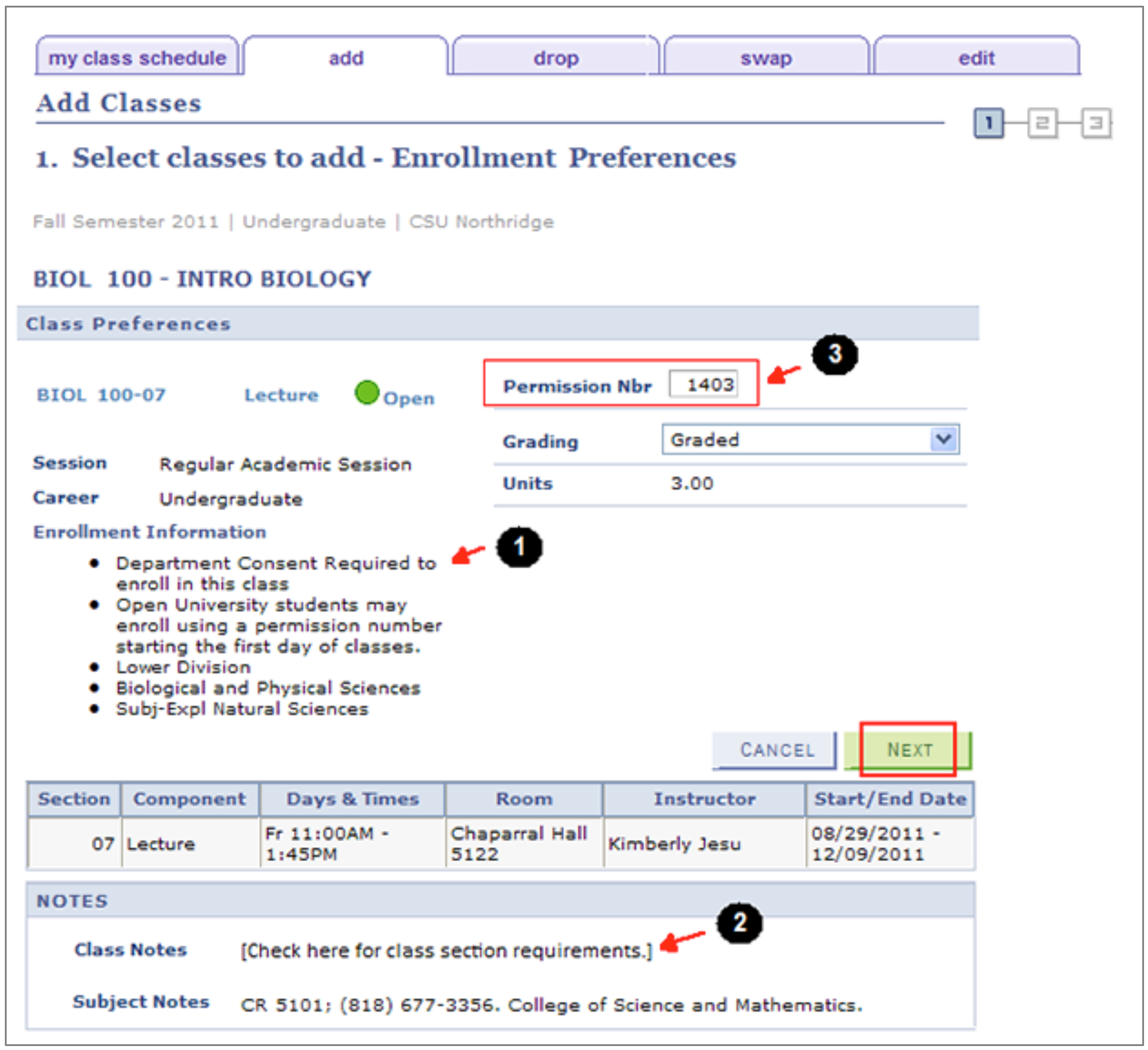
If a class is restricted, the “Notes” section of Class Search will display "Department/Instructor Consent Required" (refer to image below).

How to Use a Permission Number

Enter the permission number on the “Enrollment Preferences” page in the registration system. (For help, review the guide Add Classes and the image below.) Please note:

  1. If the class is restricted, you will see "Department/Instructor Consent Required" in the Enrollment Information section.
  2. Check “Class Notes.” If concurrent enrollment in a co-requisite class is required, obtain a permission number for each class before proceeding.
  3. Enter the number into the “Permission Nbr” box and proofread it!
  4. Select the "Next" button to proceed.

Screenshot of how to use a prermission number

A permission number can be used for a specific class until:

  • Your enrollment in the class is successful, or
  • Access to the online registration system ends, or
  • The permission number expires on an earlier date specified by the department or instructor.

When are permission numbers required?

Permission numbers are always required to enroll in:

  1. Restricted classes (e.g., those limited to certain student groups such as freshmen or seniors, majors, and credential candidates) offered in any term or semester, and
  2. Year-round, state-funded cohort programs offered during summer term.

During the fall and spring semesters, permission is required to add all classes starting with the second week of classes.

Where can I get a permission number?

Request permission to enroll in a class from the academic department or the professor as follows:

  • Before classes begin, you can usually obtain a permission number from the academic department.
  • When classes begin, you should attend the class and request a permission number from the professor (in most cases).

I got a permission number to add a class, but it isn’t working. What do I do?

First, make sure you’ve correctly entered the permission number in the registration system. If so, then the number may not be working because:

  • You have a registration hold. To view holds, log in to the CSUN Portal and locate the hold message in your Checklist. Resolve the hold and try the permission number again.
  • You have a time conflict. The registration system does not permit enrollment in two or more classes whose times overlap even by a minute.
  • You are attempting to enroll in more than the maximum unit load.
  • You’re already enrolled in the class or you’ve already taken it in a prior term.
  • You're already on the waitlist for the course, or the course is in your enrollment cart.
  • The permission number may have expired. All permissions expire when access to online, self-service registration ends; some permissions expire earlier. Contact the academic department for assistance.

A permission number works only with its associated class section. If the class requires concurrent enrollment in another class (a co-requisite class), obtain a separate permission number for each class before enrolling.

If you've tried all of the above solutions and none work, please contact Records and Registration.

Registration Holds

How do I know if I have holds that will block my registration?

Log in to your CSUN Portal. In the Checklist, find the Incomplete Tasks section and look for registration holds.

Resources

What is the Measles/Rubella hold? Why is it preventing me from registering?

Students born on or after January 1, 1957 are required to provide proof of immunization for, or immunity against, measles and rubella during their first semester at CSUN. Students age 18 or younger must provide proof of immunization for, or immunity to, Hepatitis B during their second semester. Generally, this information can be found on your high school transcript.

Note: You must clear immunization holds before you can register in future semesters.

For more information and updates, visit Immunization Requirements, or contact the Klotz Student Health Center at (818) 677-3666 or shcinfo@csun.edu.

I already met with my advisor but have a hold saying I need to meet with my advisor, and now I can't enroll. What do I do?

Contact your academic advising center to verify that the hold will be removed. You may need some follow-up advisement. Only your advisor can remove an advising hold, not Records & Registration.

Find your center at University Advising.

I have a previously disqualified hold, and now I can't enroll. Why won't it go away?

Good news — it’s not the kind of hold that will prevent you from enrolling. However, it is a reminder of disqualification.

Each time you are disqualified, the rules change for readmission to the University. After the third disqualification, the student must wait 5 years before reapplying to CSUN and taking classes here, including those offered through The Tseng College (Extended Learning).

Ask your advisor for guidance. Learn more at Disqualification.

I have a hold for missing transcripts, but I sent them to CSUN last semester. Why won't the registration system let me enroll?

Chances are you were enrolled in some classes at the other school when you submitted the transcripts. If so, then you did not have grades awarded for those in-progress classes, and the transcript you submitted was preliminary.

We need your final grades; otherwise, you’ll get a missing transcript hold placed on your account, which will prevent you from enrolling. If you feel you’ve received the hold in error, contact one of the following offices:

  • To check if CSUN has received your transcript, contact Records and Registration at (818) 677-3800, complete our Contact the Registrar web form, or visit us in the Bayramian Hall Student Services Center.
  • To learn why CSUN needs the missing transcript, contact the Office of Admissions at (818) 677-3400, email admissions@csun.edu, or drop by Bayramian Hall Room 160 during business hours.

If you are sending us a final transcript from a California community college, save time with eTranscript California.

Repeating Courses

When can I repeat a course?

You may repeat a course previously taken at CSUN when Nonrestrictive Registration begins (no enrollment appointment is needed). For specific dates, refer to the Registration Calendar.

During the fall and spring semesters, a permission number is required to enroll in all classes beginning with the second week of instruction, as soon as the wait listing period has ended.

How many times can I repeat a course?

Before deciding to repeat a course, consult with your academic advisor and review the following policies based on your class level:

 Undergraduate students can repeat up to 16 units of CSUN coursework in which they earned less less than a "C" grade for the purposes of grade forgiveness. They can repeat an additional 12 semester units of coursework for grade averaging.

  • You must repeat the course at CSUN.
  • A single course can only be repeated twice without permission. 

Please check with your academic advisor to make sure repeating a course is your best option.

Title IX Registration Hold

What is Title IX and why is the training required?

Title IX of the Education Amendments of 1972, together with other federal and state laws, protects all people from sexual harassment, violence and discrimination on the basis of gender or sexual orientation. It’s also your right to review safety plans and crime statistics for a college campus. Learn more at Your Right to Know: Student Consumer Information.

All CSUN students — and college students throughout the United States — are required to take an online, interactive sexual misconduct, violence awareness and prevention video course to promote a culture of respect.


How do I take Title IX training?

During your CSUN studies, you'll need to complete the "Title IX" course as follows:

  • New students take the initial, longer “Not Anymore” course once only, before enrolling in first-semester classes.
  • Continuing students take the short “Every Choice” refresher course once a year, before enrolling in fall classes.

Log in to the CSUN Portal and look for the "T9" registration hold (if any) in the Checklist under Incomplete Tasks. Visit the tutorial or login directly:


What if I don't take Title IX training?

All students will have a "Title IX (T9)" registration hold. You must complete the online video course before you can enroll in classes.


Are there alternatives to taking Title IX training?

We understand that the content of the training may cause particular distress for some individuals. If due to such personal circumstances you would like to discuss alternative options for meeting the training requirement, please contact CSUN’s Campus Care Advocate, a confidential resource, at (818) 677-7492.

Title IX Resources

Wait-Listing

How do I wait-list for closed classes?

Wait-listing is similar to adding a class. Log in to the CSUN Portal, select Enroll in Classes, and look up the closed class section(s) you want to wait list for. On the class Enrollment Preferences page, check the "wait list if class is full" box.

  • For a wait-listing overview, tips and illustrated steps, visit the Wait-List for Closed Classes Guide.
  • Check out the Wait List FAQs (PDF). For example, you can wait-list if you've met prerequisites, but you cannot wait-list for corequisite courses unless you're repeating one of the two corequisites.

Wait-listing for closed classes is available in fall, spring and summer terms. You can wait-list as soon as your enrollment appointment arrives through the end of the waitlist period. Find exact dates in the Registration Calendar and the Student Academic Calendar.

Withdrawals

What does it mean to withdraw?

To withdraw means to drop one or more enrolled classes.

  • Withdrawals can be partial (dropping some, but not all, classes) or complete (dropping all classes and withdrawing from the university).
  • Medical withdrawals can be partial or complete. Once classes begin, follow instructions on the Late Schedule Change Forms. Request a medical withdrawal from Undergraduate Studies or Graduate Evaluations.
  • Students may be subject to an administrative withdrawal in the first three weeks of instruction for failing to meet course prerequisites. Find a list of common prerequisites at Administrative Action on Prerequisites.

Learn more at University Catalog, Keyword: Withdrawal


What is the downside of withdrawing from a class?

Reducing the number of enrolled units may affect your eligibility for campus housing, international student status, eligibility for financial aid and more.

Also refer to the question “What happens if I don’t withdraw from a class I don’t attend?” below.

Is there a deadline to withdraw from classes?

Yes. You can withdraw (drop) yourself from a class using self-service registration until online access to drop ends.

After the deadline, formal approval is required to withdraw. Requests to withdraw are considered from students for reasons clearly beyond their control, who can justify serious and compelling circumstances.

Also refer to the University Catalog, Keyword: Withdrawal.


Will I get a grade when I withdraw from a class?

The answer depends on the timing and type of withdrawal.

  • If you drop a class before self-service registration ends, the course will not appear on your semester record and you will not receive a grade.
  • If you drop a class after the 20th weekday of fall or spring classes, you will receive a grade of “W,” which will appear on your permanent record but carries no grade point value and won’t harm your GPA.

What happens if I don’t withdraw from a class I don’t attend?

If you do not officially drop an enrolled class that you do not attend, you will receive a grade of “WU,” unauthorized withdrawal, which converts to an F.  

As a student, you are responsible for all adjustments to your schedule. You, not the instructor, are responsible for dropping a class. Please be aware that:

  • Nonattendance does not constitute a withdrawal, nor does stopping payment on a check for tuition and other fees constitute a request for a refund.
  • Failure to follow formal university procedures may result in an obligation to pay fees as well as the assignment of failing grades in all courses and the need to apply for readmission before being permitted to enroll in another academic term.

Learn more at:


Is there a limit to the number of units I can drop?

Yes. Undergraduate students are limited to a total of 18 withdrawn units during their CSUN studies. But note these exceptions:

  • Any classes you drop before instruction begins for a semester or term do not count toward the 18-unit limit.
  • The 18-unit limit does not apply to the first 20 days of instruction in a fall or spring semester, when withdrawals from courses are permitted without restriction or penalty.
    • Whether partial or complete, medical withdrawals do not count toward the maximum 18 units.

To check the number of units you've withdrawn from, visit View Withdrawals/Repeats for Undergraduate Students.

Undergraduate and graduate students will find details in the University Catalog, Keyword: Withdrawal.


If I withdraw, will I get a refund?

You might be eligible for a refund depending on the total number of units you are enrolled in and the date that you withdraw or drop.

Visit Student Finance/Cash Services Refunds to learn more about the types of refunds — full, partial and prorated refunds — and deadlines.