This is a tutorial only. No log in is required.
Introduction
Before repeating a course in an upcoming term or withdrawing from a course (i.e., dropping) after the fourth week of the semester, review the following policies and rules and consult your academic advisor:
This guide explains how to use the Withdrawals/Repeats pages of the SOLAR Student Center to track the courses and number of units you’ve withdrawn from and repeated in your studies at CSUN.
Beginning with the Fall 2009 semester, withdrawals and units repeated for grade averaging will be counted from zero. However, units repeated for grade forgiveness are counted for your entire CSUN career.
Step 1
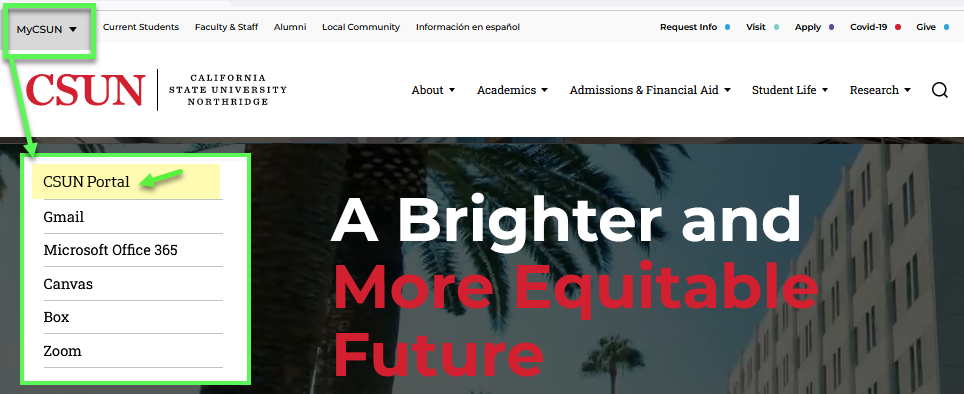
Go to the CSUN home page at www.csun.edu and:
- Open the MyCSUN menu in the top navigation.
- Select the CSUN Portal link.
- Log in with your CSUN user ID and password.
Step 2
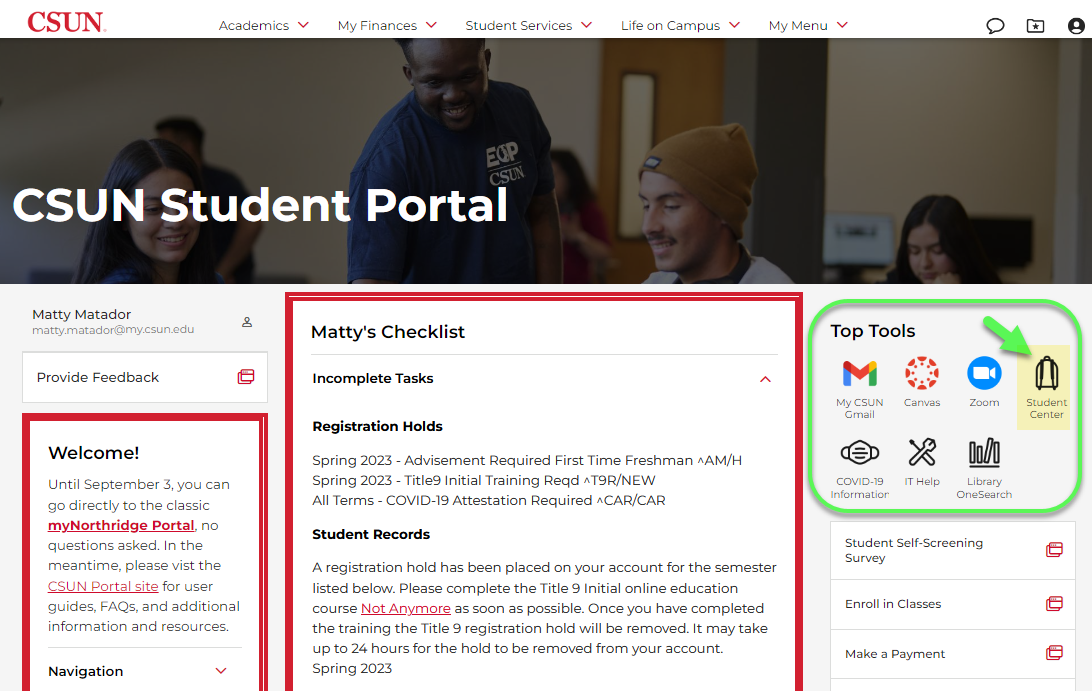
Your CSUN Portal home page displays.
In the Top Tools section, select the Student Center backpack icon link.
Step 2a
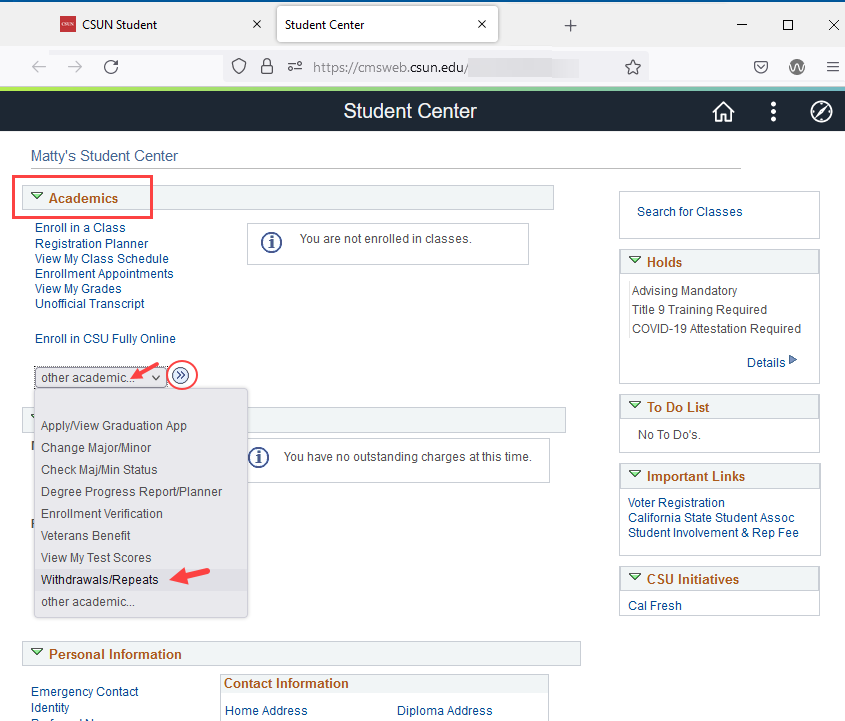
The SOLAR Student Center displays.
- Under the top Academics heading, open the "other academic..." drop-down menu.
- Choose Withdrawals/Repeats from the list of links.
- Select the "go" button.
Step 3
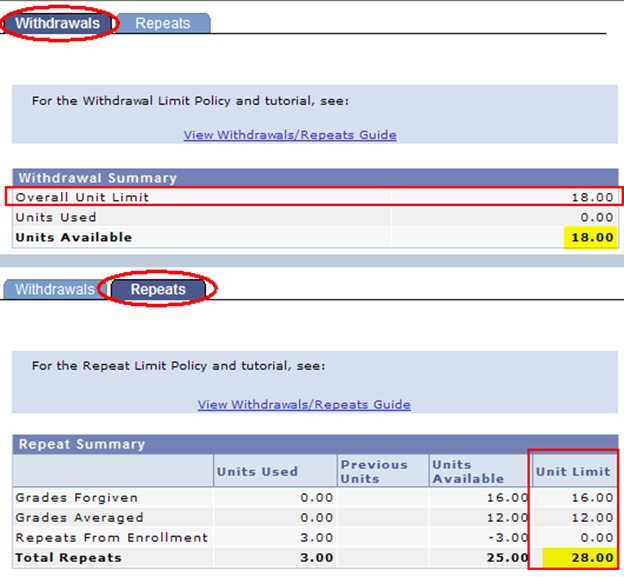
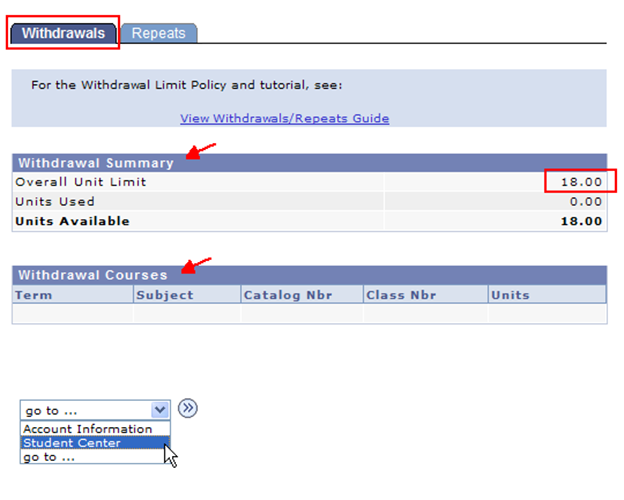
The Withdrawals and Repeats page displays two tabs at the top. The page defaults to Withdrawals, which has two tables:
- Summary – Counts the units available for withdrawal starting with the Fall 2009 semester. Withdrawal limit: 18 units.
- Courses – Lists the CSUN classes from which you’ve withdrawn beginning Fall 2009.
Withdrawing is officially dropping one or more classes after the deadline to adjust your schedule (i.e., after the 4th week of classes for the fall and spring semesters).
For fall and spring term details, see Late Schedule Changes.
Important! Before withdrawing:
- Review the Withdrawal Limit Policy.
- Understand that reducing the number of enrolled units may affect your eligibility for Financial Aid and other privileges. See Academic Program Changes.
Step 4
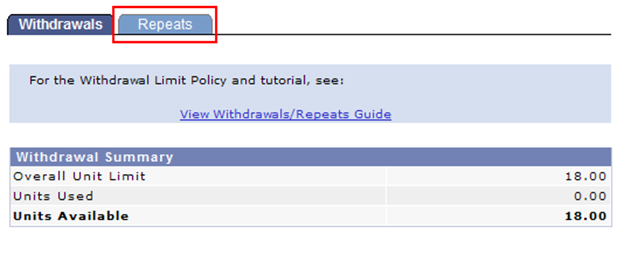
Select the Repeats tab to view the Repeats page.
Step 5
Important! Before repeating a course, review the Repeat Limit Policy and consult your academic advisor.
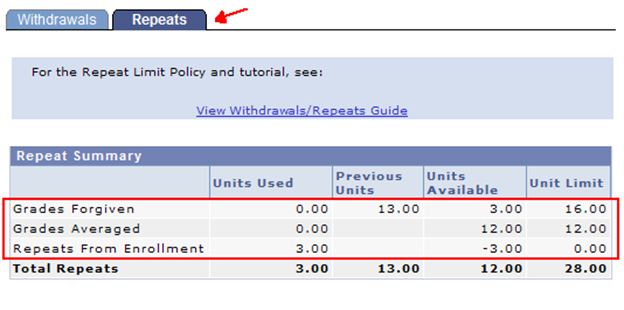
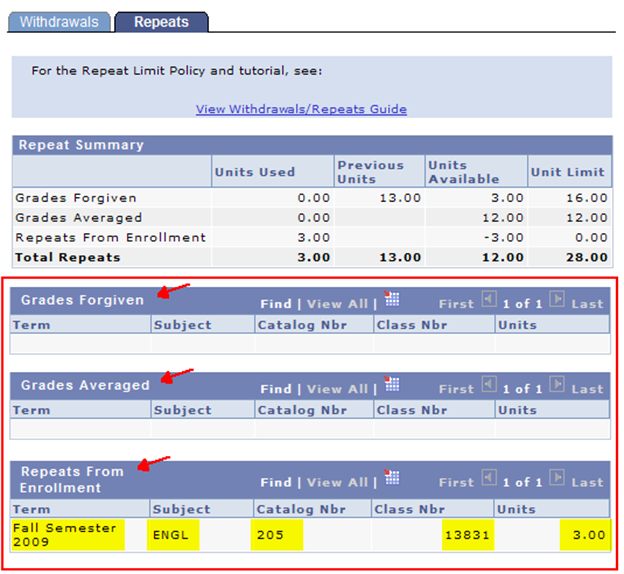
The rows in the Repeat Summary table present your repeated units in 3 categories:
- Grades Forgiven – Units that replace a CSUN grade, counted for your entire CSUN career.
- Grades Averaged – Units for which the original and the repeated grades will be calculated into your total GPA, counted from Fall 2009 on.
- Repeats from Enrollment – Units you’re repeating in the current term or semester. Units will move to the forgiven or averaged columns after grades are posted and end-of-term processing is complete.
Note: A negative number of units, such as minus 3 (–3.00), means that the units have not yet been "charged" as forgiven or averaged.
Step 6
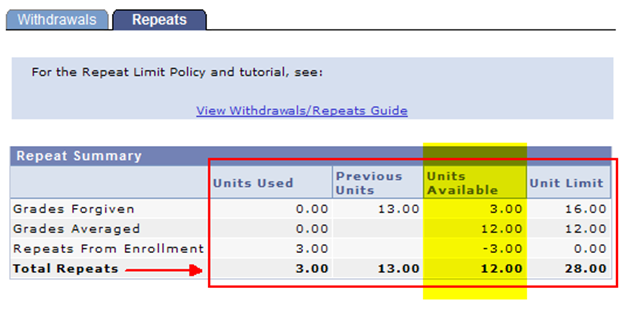
Columns 2 through 5 of the Repeat Summary table count repeated units as follows:
- Units Used: Counted from Fall 2009 and later
- Previous Units: Counted prior to Fall 2009
- Units Available: Unit Limit minus (Units Used + Previous Units)
- Unit Limit–Maximum for each type of repeat:
—16 units for Grade Forgiveness
—12 units for Grade Averaging
—(28 units combined total)
Step 7
The Repeats page includes three more tables that list the courses you have repeated in each of the following three groups, starting Fall 2009 and later:
- Grades Forgiven
- Grades Averaged
- Repeats from Enrollment – Courses you are repeating in the current term or semester. Courses will move to the forgiven or averaged list about 3 weeks after fall or spring finals end.
Notes:
1) If this is the second time the student is repeating ENGL 205, the 3.00 units will move to the Grades Averaged row even though 3.00 units are available for Grade Forgiveness.
2) Courses for which grades were forgiven will be listed from Fall 2009 and later.
Step 8
Students are not permitted to withdraw or repeat beyond the unit limits established by the following policies:
Before repeating or withdrawing, consult your academic advisor for the best options in your situation. Advisors for the College of your major (or Undecided) are listed at Academic Advisement.
For other questions, contact Admissions and Records using our contact page.