CD 485 Computer Applications in Communication
Disorders and Sciences
IDENTIFYING THE APPROPRIATE DATABASES – JOURNAL
ARTICLES THROUGH EBSCOHOST & OTHERS
Many, if not most, of the
research sources we need, will come from the non-book
category (journals, newspaper articles, government documents, etc.) It is true
that we can find out if the University has a particular journal from Library
Online Catalog or WorldCat, but we cannot search for
specific journal articles in these databases.
For this, we must use other
databases, and there are quite a few. For the seasoned, and somewhat removed,
doctoral student who has spent 30 years in the library working on his
dissertation, these databases are as different as night and day. Each one has
strengths and weaknesses and he/she knows what they are and how to use them to
the best advantage. For normal folks, however, who work and/or have families
and a life, the choice of databases is almost overwhelming. Hence, we will not
try to learn or use them all. We will only look at a few of the most powerful
ones in our field.
Just
as we had a dichotomy in the literature (books versus non-books) there is a
dichotomy developing in the non-book world, and I must say this one has even me
excited! It is electronic - versus non-electronic journals. The former refers
to Journals whose articles are available in full-text over the Internet. More
and more, it is becoming unnecessary to trudge across town in the wee hours of
the evening to seek a journal article, only to find it gone because someone has
cut it out with a razor. For busy CD students in particular, full text journal
articles (and soon full text books) are the greatest invention since the wheel,
if not cable TV.
In
the last Section, we were introduced to the role that Provider Services play in
making databases accessible to CSUN Students In that Section we looked for book references in a
database called WorldCat whose Provider is First Search.
In this Section we will be looking for journal references in
databases with different providers:
This will include among others:
1.
EBSCOHOST with a number of databases.
2.
CSA with ERIC and LLBA
3.
WILEY INTRSCIENCE with Cochran Library
4.
ENGINEERING VILLAGE with INSPEC
5.
THOMPSON GALE with HEALTH REFERENCE CENTER
6.
ELSEVIER with SCIENCE DIRECT
7.
WILSON WEB with EDUCATION FULL TEXT
A.
IDENTIFYING THE APPROPRIATE DATABASES –
JOURNALS FROM THE PROVIDER EBSCOHOST
EbscoHost
provides access to 14 databases and
includes full-text access, and depending on the database, links to check CSUN Oviatt Library holdings. Five of these 14 databases are of particular interest to
Communication Disorders students:
1.
CINAHL
Plus with Full Text (EBSCO) which Indexes over 3,000 nursing and allied health
journals. It provides cited
references from 1,600 journals; and provides full-text access to many journals
and other sources. It has been in
service since 1937.
2.
PsycINFO (EBSCO) which Indexes over
2,000 journals plus books and book chapters. This has been in service since 1987.
3.
Academic Search Elite (EBSCO) which abstracts to
3,000 journals (over 1,500 peer-reviewed journals), with full text to more than
2,000 of the journals. Although dates may vary, this service goes back to 1985.
4.
Communication & Mass Media (EBSCO) which abstracts over 600 journals in communication
studies, speech, mass media, journalism, linguistics, and communicative
disorders. Full text for more than 240 journals are
available. Dates vary as early as 1915.
5.
ERIC, the
Educational Resource Information Center, which contains more than 1,194,000
records and links to more than 100,000 full-text documents.
One great advantage of using
a Provider like EbscoHost is that you can search all five of these databases at one time.
To get to EbscoHost (or to any of the individual databases included)
we could follow the same path as we did to find the book databases through the Communication
Disorders Library Home page.
Another more basic route to Ebscohost,
however, begins on the Library Home page, in the box labeled “Start
Your Research” where we can click on the Databases A-Z link.
CSUN Oviatt
Library Home Page
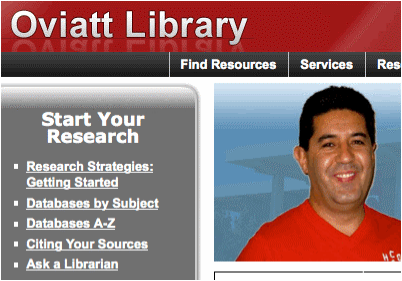
This Databases A-Z link
sends us to the top of the Resource list, but we can use the Index at the top
to go directly to the “E” listings.
CSUN Library
Database A – Z Index
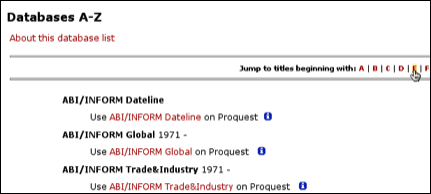
This will move us down the
list to the EbscoHost link. This will finally take us…

…to
the EbscoHost
Search Page where we can select all five of the databases…
EbscoHost Home Page.
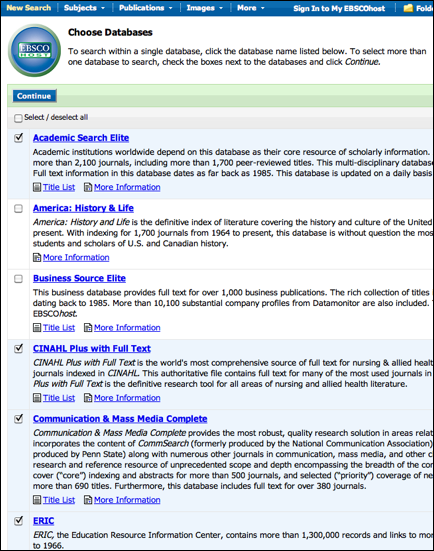
…that
are most germane to Communication Disorders. Clicking on any of the databases provided by EbscoHost, like Eric for example,
would have brought us to the same place.
Here we cam select one or more databases in which to continue our
search. In this case, there will
be five. Proceeding on to
the Basic Search (by clicking on the Continue link in the upper left hand
corner) we can input our search terms: AAC and Communication. Since we had previously checked off
five databases for our search, they are listed above
EbscoHost Basic Search Page
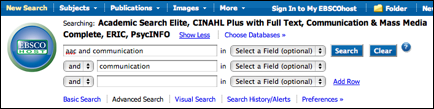
after the word “Searching.” By scrolling down, we could refine the
search more by selecting a number of options such as English, years, type of literature,
etc. It is interesting that we can
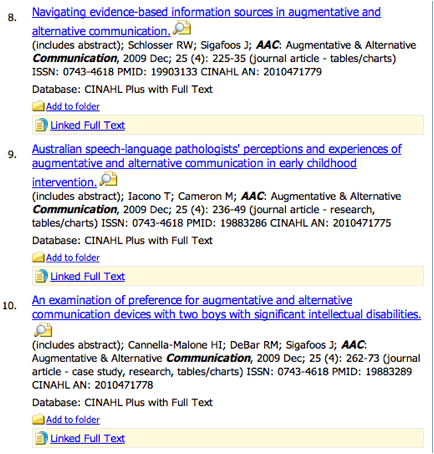
also include a search for books using these databases. As it is, our search returns a large
number of article references (below), many of which are available in Full
Text. Below, for example, please
note the “Linked Full Text” link on references 8, 9 and 10.
EbscoHost Search Results
Clicking on the Linked
Full Text link (shown above) gives us the actual article, part of which
is show below
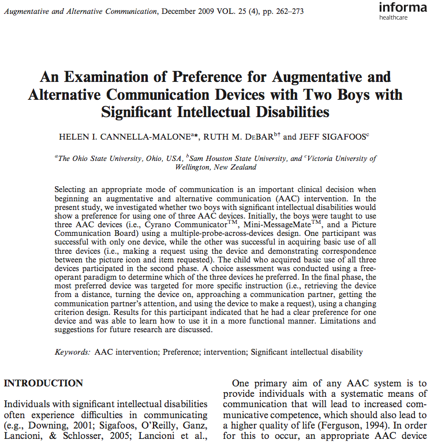
Years ago, it would have
taken us maybe multiple trips to the library and hours of searching to get this
article, which with a little practice we can now pull up in a matter of minutes
without ever leaving home.
Research doesn’t get any better than this!
B.
IDENTIFYING THE APPROPRIATE DATABASES –
JOURNALS FROM THE PROVIDER CSA AND
THE DATABASES ERIC and LLBA
CSA Databases provides
access to seven databases including some with full text access and information
about print resources. The main
databases of interest to Communication Disorders Students are ERIC and LLBA. The former we also found in EbscoHost—Eric.
The search page of course will have a different format in CSA. We could access this from the
Communicative Disorders Home page, or from the A-Z list using either CSA or
Eric.
A to Z Listing for ERIC (Educational Resources Information
Center)
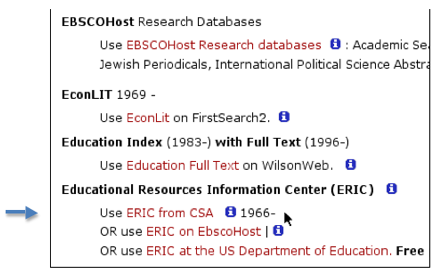
As you can see above, there
are actually three paths to ERIC, each of which will have a different search
page format. We, of course, will
be looking in the CSA Provider contracted
by the CSUN Library. If we were not
CSUN students, we could use the third choice, the US Department of Education,
which is free. The CSA Search page
looks as follows:
CSA Search Page
for ERIC
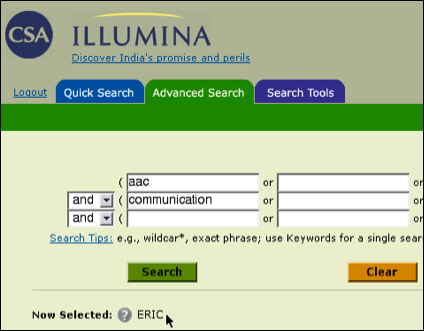
There are, of course, many
options available if we wish to scroll down the Search Page. Also, please note the helpful Search
Tips available just under the boxes for the search words. Using just this simple strategy we come
up with 163 references. Of these,
126 are journal articles (of which 73 are Peer Reviewed), and 5 are books. Your results may vary slightly as
changes occur over time.
CSA Results for
ERIC
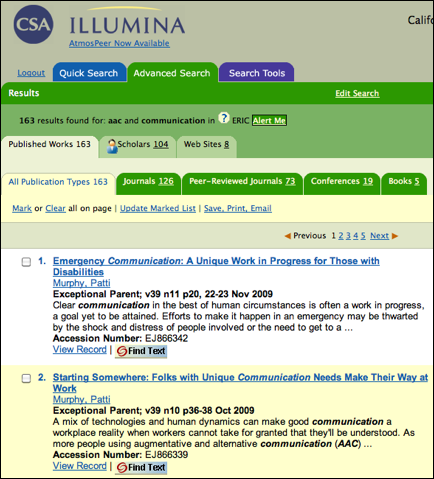
To the right (not shown
here) is also a list of descriptor terms which we
could use if we wanted to start another search with different terms. Clicking on the article title or the View
Record option will give us the full citation.
CSA Full Citation
for ERIC
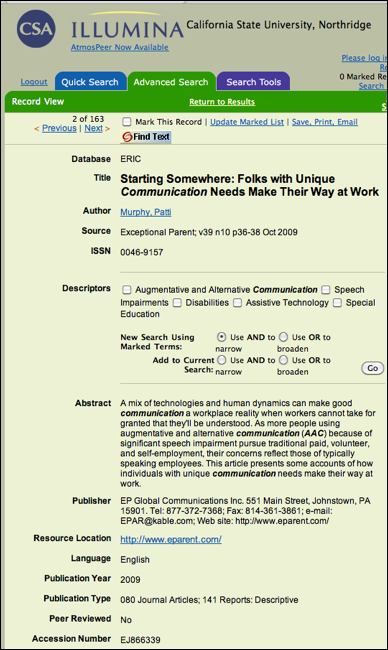
In addition to all the
information here in the Full Citation, we can pursue the “Find Text “link as we did previously to automatically format the
reference in an APA style by using the “Save
citation information” link.
CSA Find Text Link in ERIC
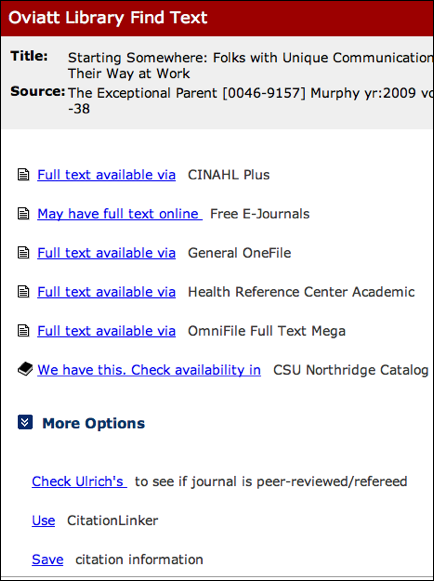
We are also informed that
the Full Text is available from several sources; and that the publication is
available in the CSUN Library. If
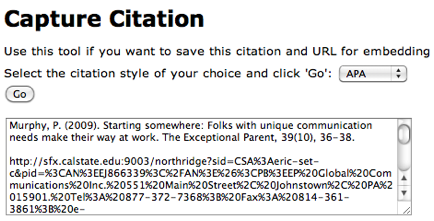
we click on the Save citation information,
we will have the option to chose the Style we wish, such as MLA, APA or
others. If we select APA and click
on Go, the reference will be given
in APA format. We can copy and
paste the reference in this style into our paper if that is what we need
We could also pursue the
Full Text by clicking on either links, but we have other Providers and
Databases to explore for now.
The same procedure, as
described above for CSA, can be used to search the LLBA (Linguistics and Language Behavior Abstracts) database.

As described by our Library,
“This database provides current selective access to the world's literature on
linguistics and language behavior as a service to all researchers and
practitioners in disciplines concerned with the nature and use of language.
LLBA provides abstract listings of periodicals, reports, books and conference
proceedings in the fields of language learning, speech disorders, and special
education in communication, among other topics. Articles abstracted in LLBA are
drawn from approximately 1,200 regularly scanned domestic and international
journals.” Hence, this is an
excellent source of references relevant to research in Communicative Disorders. But it is only available through the
CSA Provider to students enrolled in CSUN.
C.
IDENTIFYING THE APPROPRIATE DATABASES – JOURNALS FROM THE PROVIDER WILEY INTERSCIENCE AND THE DATABASE COCHRAN LIBRARY
Wiley InterScience is a full-text resource for
journal articles. It also indexes hundreds of online books and several
Wiley reference works. There is only one database in the Provider and that is
the Cochran Library. We can access
this through the Communication Disorders Library Home page, or the A to Z
resource listing either under the Provider, Wiley InterScience
. . .
CSUN Library Database A – Z Index Under “W”

. . . or the database, Cochran
Library.
CSUN Library Database A – Z Index Under “C”
The format of the Search Page will look like this…
Wiley InterScence Provider with the Cochran
Library Search Page
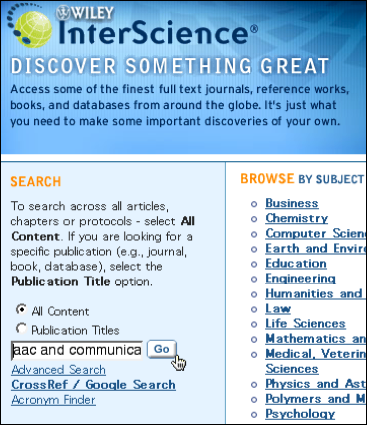
Using just a basic search strategy and the
words “aac and communication” we will retrieve
around 46 references.
Wiley InterScience Provider with the Cochran
Library Results Page
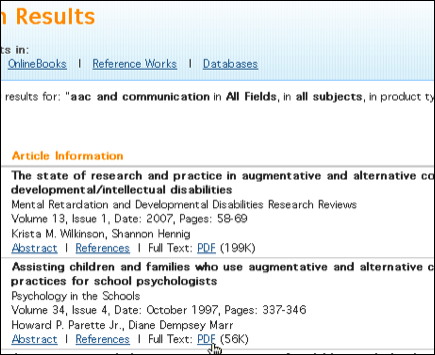
These have the full text available as a PDF files.
D.
IDENTIFYING THE APPROPRIATE DATABASES – JOURNALS FROM THE PROVIDER ENGINEERING VILLAGE AND THE
DATABASE INSPEC
Engineering Village includes two
databases: Compendex
and INSPEC. While they both may
have articles germane to a study of AAC, of particular interest to
Communicative Disorders Students would be INSPEC.
·
Compendex - abstracts 5000 engineering journals, conferences and reports in
all areas of engineering from 1969 to present.
·
INSPEC- indexes 3,500 technical and scientific journals and 1,500
conference proceedings in physics, electronics, computing, control
engineering and information technology. Coverage is from 1969 to the present.
INSPEC
can be accessed from the A-Z Index or from the Communicative Disorders Library
Home Page. It has a search page
that looks like this:
Search Page of
INSPEC in the Provider Engineering Village
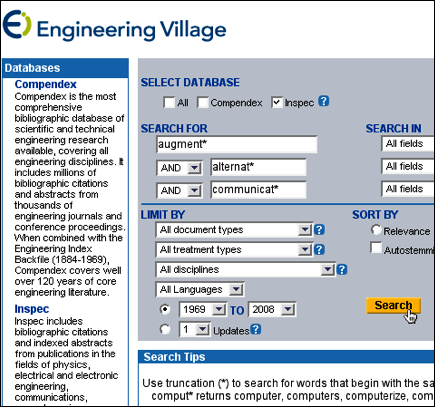
It
is worth noting that Search Tips at the bottom of the screen provide useful
hints for our search strategy. I
always recommend sorting by Date so we get the most recent articles first. It is possible to search both INSPEC
and Compendix at the same time, but I am not sure
that is of any advantage to a search for AAC references. We might wish to try it out by checking
that option under “Select Database” at the top of the page. Using the simple search strategy, “alternat* augment* communicat*, we
get 200 references.
Results Page for Inspec in Engineering
Village
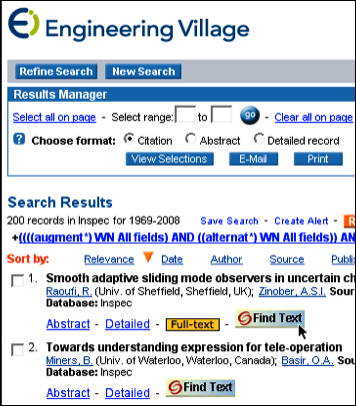
There
are the familiar links to “Find Text” which we can use to see if the reference
is in the CSUN Library or any CSU Library; and we can also automatically format
the reference in an APA format.
There is also a Full-text link.
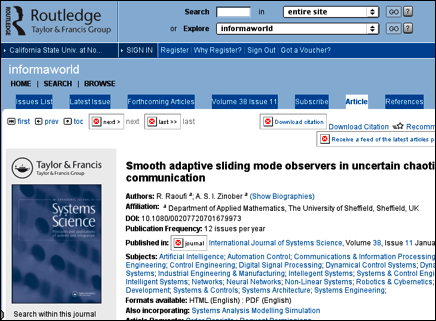
In this case it only leads us to an abstract. If we take this link we need to realize that we will eave
the Engineering Village format and enter another entirely different database in
a different Provider, in this case Informaworld in a
Provider called Routledge, Taylor and Francis Group.
We would then have to use the back arrow on the Browser if we wanted to return
to Engineering Village and INSPEC.
Full Reference from Informaworld in Routledge Taylor & Francis Group
E.
IDENTIFYING THE APPROPRIATE DATABASES – JOURNALS FROM THE PROVIDER THOMPSON GALE AND THE DATABASE HEALTH
REFERENCE CENTER.
The THOMPSON GALE Provider
(actually, I think they are dropping the Thompson and going just by Gale) has
database of particular interest to Communication Disorders Students called Health Reference Center Academic. It can be accessed through the A
–Z Index or the Communication Disorders Library Home page. I recommend using the database name and
not the Provider. The search page
looks as follows:
Basic Search Page
for “Heath Reference Center Academic” in Gale
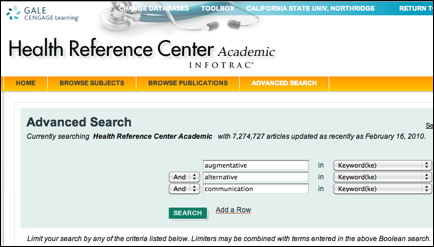
Without limiting the results
by the options listed farther down the page (not shown above) we obtain 213 references .
Results Page for
“Heath Reference Center Academic” in Gale
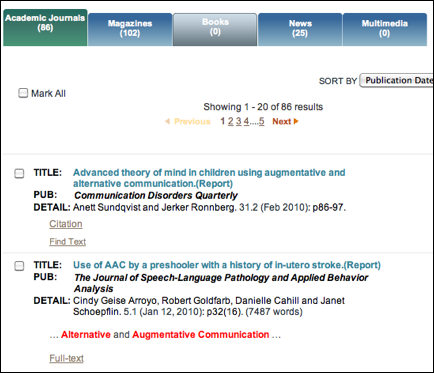
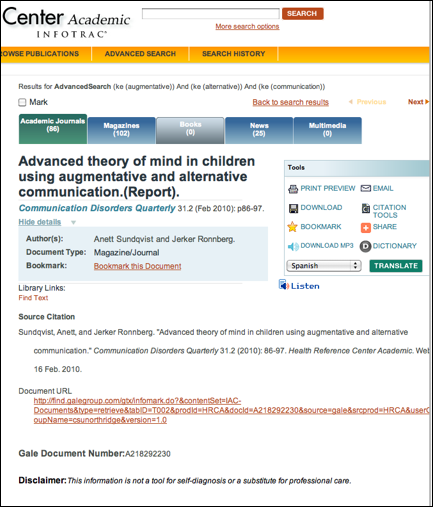
Eighty Six of the references are in Academic Journals, 102 are
in Magazines and 25 are news reports.
No books are listed. We need to click on the Tabs to see the individual
References. If we click on the
reference itself however, we can a full text reference and even have it
translated into another language!
Full
Text Reference for “Heath Reference Center Academic” in Gale
F. IDENTIFYING THE APPROPRIATE
DATABASES – JOURNALS FROM THE PROVIDER ELSEVIER
WITH THE DATABASE SCIENCE DIRECT.
Science Direct in the
Provider Elsevier has over 1700 science and social science journals published
by Elsevier, Academic Press, and several other publishers; full text from 1998-
as well as abstracts of hundreds of journal articles from partner
publishers. It can be accessed
through the A – Z Index or the Communication Disorders Library Home page. It has a search page that looks as
follows:
Search Page for Science Direct in the Provider Elsevier
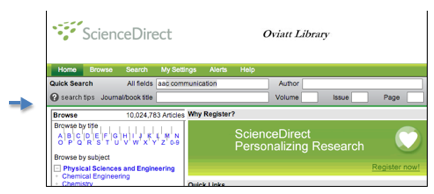
Please note the
“Search Tips” link available in the left upper corner (see arrow above).
Conducting a simple Keyword search using the terms “aac
communication” we get more than 6000 references. We may wish to reduce this number by using the Advanced
Search option (see the arrow below), and some of the delimiters like dates,
Content type, Language, type of publication, etc.
Results
Page for Science Direct in the Provider
Elsevier
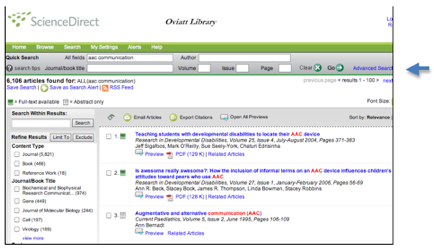
Please note that the
white book icon to the left of the reference indicates that CSUN does not
subscribe to this journal. But the
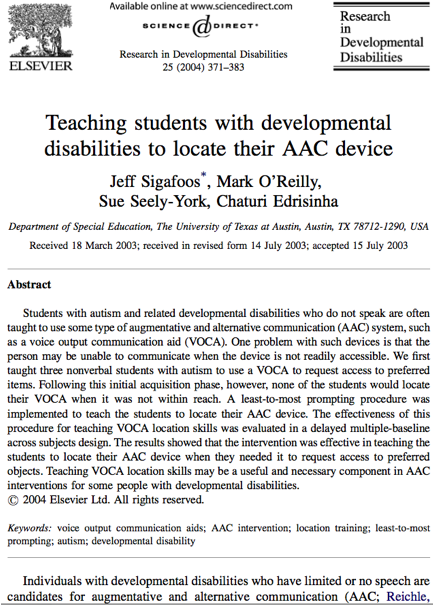
green book icon indicates that the article is available online. Clicking on the Full Text link under
the reference takes us to the online article, or we can have also get the full article in PDF format (see below).
Full Text Article
for Science Direct in the Provider Elsevier
G. IDENTIFYING THE APPROPRIATE
DATABASES – JOURNALS FROM THE PROVIDER WILSONWEB
WITH THE DATABASES EDUCATION FULL TEXT
and OMNIFILE FULL TEXT MEGA.
The WilsonWeb Provider includes many databases including Art
Full Text, Art Index, Biography Index, Book Review Digest Plus, Business Full
Text, Education Full Text, General
Science Full Text, Humanities & Social Sciences Index Retrospective,
Humanities Full Text, Library Literature & Information Science Full Text,
Library Literature & Information Science Retrospective, OmniFile Full Text Mega, Readers' Guide
Retrospective, Readers' Guide Full Text, and Social Sciences Full Text.
The two databases
that interest us the most are, Education
Full Text and OmniFile
Full Text Mega. The latter
does a cross search in all these databases.
We can access the
Education Full Text database either through the A – Z Library Index or
the Communication Disorders Library Home page.
A – Z
Library Index

The search page looks
something like
this:
Search Page for
Education Full Text Database in Wilson Web
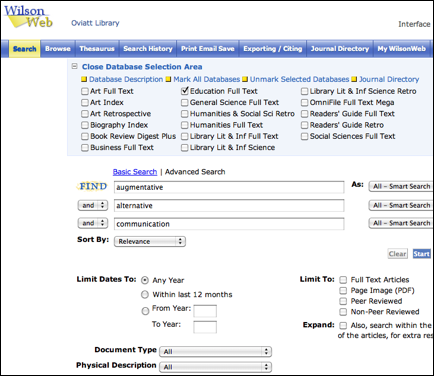
It was necessary to pull
down the Database Selection area to choose the Databases we wish to
search. In this case we have
checked the “Educatlon Full Text Database. Using the smart search option and
sorting by date we get 119 records.
If we had also checked off the Omni Full Text Mega option, we would have
obtained around 158. As it is,
most of the references we have can be obtained in Full Text online in HTML or
in PDF format. It is
interesting that if we had limited the search to Full Text only we would still
have received 67 records.
Search Results
Page for Education Full Text Database in Wilson Web
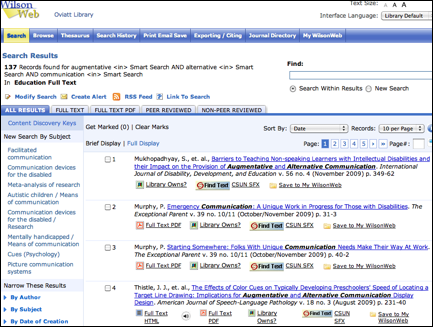
The number of useful records
with their full text in all these databases is certainly amazing and much can
be done with these. In the next
Section, however, we will look at some of the “big guns” available to CD
student to do research.
These include, Medline, PubMed and
Communications Disorders Multi Search.