Current
Location: Section VI - Identifying the Appropriate Databases – Books from
The University Library Online Catalog
[
Top ] : [ Module 3 ] : Section V -
Identifying the Appropriate Databases --
Books from the University Library Online Catalog.
Course
Documents
SECTION VI
Identifying the appropriate databases – The University
Library Online Catalog for Books
There may be times when you will want to use The University
Library Online Catalog, for books and journals (we discussed World CAT
in Section V). There are a few features, which I would like to draw your
attention to. The University Library Online Catalog can be easily
accessed from the University Library Home Page by clicking on the Online
Catalog link…
University Library Home Page
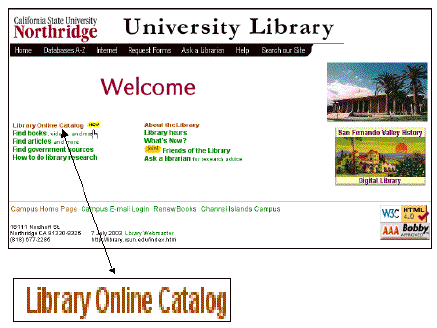
The Library Online Catalog can also just as easily be accessed
from the home page for Communicative Disorders Distance Learner’s: Databases and Document Delivery.
http://library.csun.edu/mhenry/de-comdis.html
Just click in the “Library Online” link
in the first sentence under the heading Documents and Delivery (see
below).
Home Page for Communicative Disorders Distance Learner’s: Databases and Document Delivery
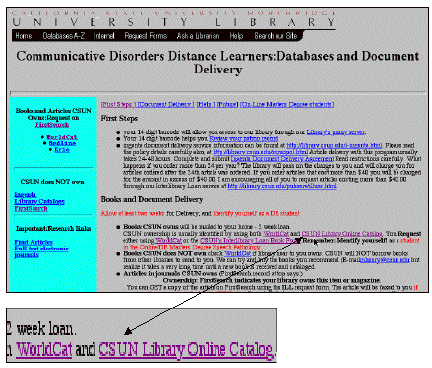
When I click on the CSUN Library Online Catalog link, I am presented
a number of options with which to begin the search.
CSUN Library Online Catalog
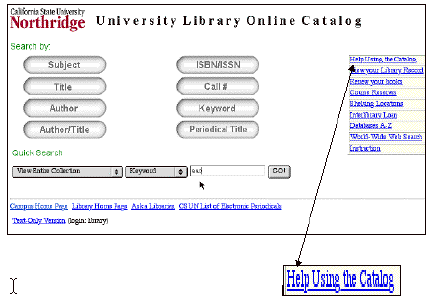
But
before I do anything, I am going to check out the Help Using the Catalog link! This will give me some crucial hints
that will save me much time and increase the efficiency of my search
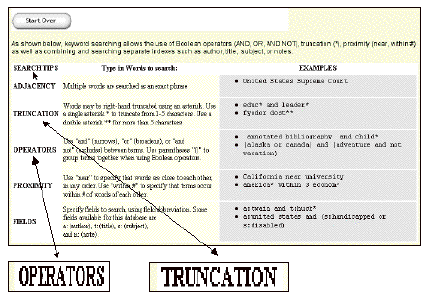
strategy. In particular I will pay
attention (scroll down) to the Search Tips section, which touches
upon among other things two critical concepts—Truncation and Boolean
Operators.
About the University Online Catalog (Search Tips)
The
brief explanation of “Truncation” is worth repeating here. If I
type in a word like “ Communication” for a key word search, that is
what the search engine will look for and I might miss a reference which used
the word Communicative or Communicate etc. But if I use the truncation symbol (*) after the root of the
word, as in Communicat*, the search engine will pick up references with the
words Communication, Communicative, Communicate, Communicating or Communicated
etc. It widens my search
considerably. One asterisk can
replace from 1 to 5 characters. If
I think there may be more, I would have to use two asterisks. Other databases use the truncation
symbol concept, and some even use the asterisk too, but not all do! So it is important to check out the
instructions to find out what the truncation symbol for a particular database
is.
The
use of Operators to make a Boolean Search is also a very important feature of a
search strategy. In the Online
Library Catalog, typically, multiple words presented adjacent to each other are
searched for as an exact phrase.
If I type in “Alternative Devices for Communicatively Disabled
Persons,” this exact phrase must appear in the reference before it is
reported to me by the search engine.
Linking words, which are provided by the search engine, like
“and,” “or,” and “not” can be used in
creative ways to shape the search.
For example if I use “and” in the keyword search, (eg.,
“augment* and alternat*,”) the search engine will report only references
that have both those words in the reference. But if I use “or” (eg., “augment* or alternat*,”) it
will report references that have at least one or both of the terms. But if I wanted to exclude references
dealing with alternative devices, I would use the operator (and not), (eg.,
“augment* and not alternat*.” )
In
a Boolean search strategy, you should also pay close attention to the use of
parentheses. If I use for my
search, the words “ augment* and alternat* and not hearing,” the
search engine would exclude references including mention of hearing devices
that were alternative, but include hearing devices that were augmentative. To have hearing devices excluded from
both, I would have to search for “(augment* and alternat*) and not hearing.”
Now
back to the University Library Catalog and it’s search engine.
CSUN Library Online Catalog (Quick Search Strategy)
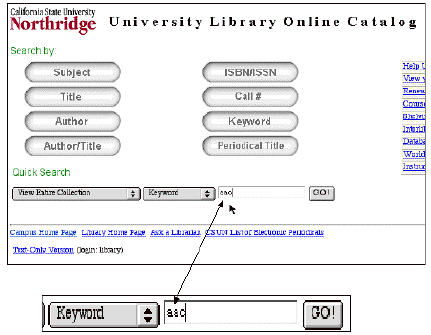
If
I know the Title, or the Author or the Call Number of the book I want, I will
be able to go directly to the reference by using those options in the Search
Engine. If not I would probably
wish to search by using a relevant keyword or words that might be appear in the
title, index or text.
I
am also given the option, if I don’t want to do a Boolean Search, to use
a “Quick” search strategy.
As a first step, for example, to see what is out there, I might type in
a common abbreviation for Augmentative and Alternative Communication Devices
frequently used, “AAC.”
This
rudimentary Quick Search gave me at this time nine references, most of which
are quite germane to our topic.
University Library Online Catalog (Initial Reference List
of Books from Quick Search)
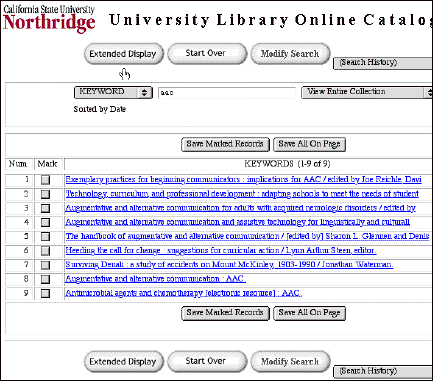
Number 3, for
example, is “Augmentative and alternative communication for adults
with acquired neurologic disorders / edited by… c2000.”
There are a number of useful options on the screen and we should
take note of all of them. The Extended
Display link, for example, will immediately give us more information on
each reference. For example, the
Extended Display for Number 3 gives us the additional information.... “Augmentative
and alternative communication for adults with acquired neurologic disorders /
edited by David R. Beukelman, Kathryn M. Yorkston, and Joe Reichle.; Floor3:IN
LIBRARY 2000.” So now we have the full name of all the
editors, and even the floor in the library where the book is located.
Of course, if I click on the link for
reference Number 3, I get the full reference with even
more important information. This
includes among other thing, the Call Number, the ISBN number and the fact that
the book is presently in the Library.
University Library Online Catalog (Full Reference)
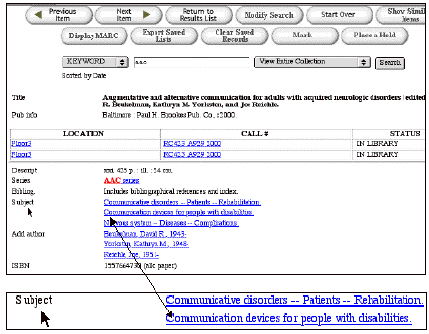
The notes opposite the “Subject” category can be very
useful in providing me with relevant words (other than aac) that I can use in
further search efforts. For
example, we see the words “Communication, devices and disabilities,”
which may be good search terms.
Of course, all this came about through the “Quick
Search” option.
If I wanted a more extensive list of references I might go to the
Keyword Search strategy with its Boolean search capability…
CSUN Library Online Catalog (Keyword Search Strategy)
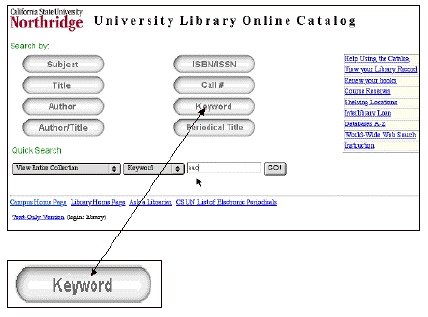
Clicking on this option changes the screen so that a Boolean
Search can be conducted.
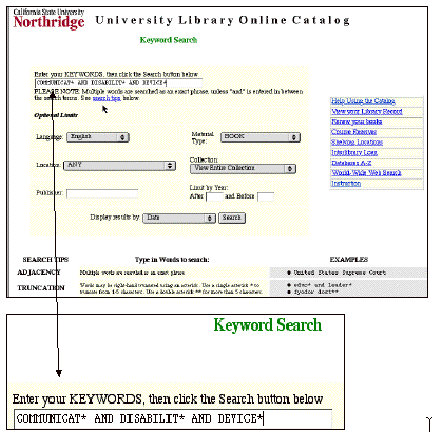
If we enter in the keywords,” COMMUNICAT* AND DISABILIT* AND
DEVICE*”, and limit our search to books we get a return of 96 book
references on AAC.
Once we find a reference we want we can obtain the book (as long
as it is owned by the CSUN Library) by using WorldCat and the inter library
loan (ILL) procedure.